
Roblox is one of the most popular games among children, often already at primary school. And in many families the same sentence can be heard every evening: “Just a little bit longer, I’m almost done!”
Sound familiar? In this article you can read what Roblox actually is, why stopping is so hard and how to make good screen time agreements together with your child. Without arguing every day.
What is Roblox?
Roblox is not one game. It is a huge collection of games made by players themselves. There are millions of them. Your child can complete an obstacle course (an “obby”), run their own restaurant, look after pets or play hide and seek with friends.
- Free to download: on phones, tablets, computers and games consoles.
- Online together: children play with friends, but also with players they don’t know. They can chat with each other.
- Robux: the in-game currency. You buy it with real money, for clothes, extras and advantages in the game.
Why is stopping Roblox so hard?
It is not your child’s fault. Roblox is designed to make you want to keep playing.
- There is no end. After one game, the next one is already waiting. There is never a moment when the game is “over”.
- Friends play along. Stopping feels like letting your friends down.
- A reward every day. Many games reward you for coming back every day or playing longer.
- Always something new. There are constantly new games, events and items. You don’t want to miss anything.
So a parent who says “stop now!” is up against a game that says “stay a little longer”. No wonder they clash.
How much Roblox is normal?
There is no fixed number. Every child and every family is different. More important than the exact number of minutes is that there is still room for other things: sleep, homework, playing outside, sport and family time. And that the agreements are clear, so you don’t have to discuss them all over again every day.
Roblox parental controls
Roblox has its own settings for parents. Create your own account and link it to your child’s account. Then you can, among other things:
- set a daily limit for screen time;
- restrict purchases of Robux;
- decide who your child may chat with, or turn chat off;
- choose which games are suitable for your child’s age.
Be sure to turn those settings on, especially for chat and purchases. Roblox changes its settings regularly, so check Roblox’s own help pages for the current steps.
But note: a limit in the app simply locks the game. It does not teach your child how to manage time themselves. For that you need agreements you make together.
9 tips for Roblox and screen time
1. Make the agreements together
Sit down together and agree how much screen time there is per week. Let your child have a say. Your child will stick to an agreement you made together much better than to a rule from mum or dad.
2. Put it on paper
Write down the agreements and both sign them. The Mytimingcards contract makes that easy. If there is a discussion after all, just get the contract out.
3. Put your child in charge
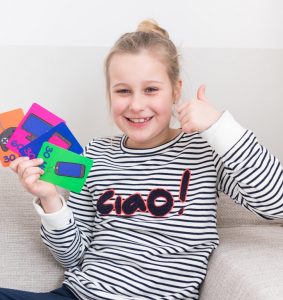
With Mytimingcards, your child gets time cards of 15, 30 and 60 minutes. Your child decides when to hand in a card. That way they learn to plan and think ahead.
4. Save up for playing together
Is your child meeting friends online at seven o’clock to play? Then they keep a card aside for it. That way they don’t have to drop out halfway.
5. Agree what happens when the timer goes off
For example: the current match may be finished, but no new one starts. That prevents the endless “just one more round”.
6. Make agreements about Robux
Agree whether your child may buy Robux, and with which money. For example a fixed amount of pocket money per month. It is best to switch off purchases with your own payment details.
7. Talk about chat and safety
Explain that not everyone online is who they say they are. Agree that your child never shares personal details, and that they can always come to you if something doesn’t feel right, without immediately being banned from playing.
8. Play along sometimes
Ask your child to show you their favourite game. Then you know what your child is talking about. And it is fun time together straight away.
9. Reward good behaviour
Has your child kept to the agreements well for a week? Then give them a bonus card. That works much better than punishment.
Frequently asked questions about Roblox
Is Roblox suitable for my child?
That depends on their age and on the settings. Roblox has lots of fun and creative games, but children can also come into contact with strangers. Turn on the parental controls, take a look yourself and talk about it with your child.
Does watching Roblox videos on YouTube count as screen time too?
You decide that together. Many families count all screens: playing, watching videos and texting. Put it in the contract, so it is clear.
My child gets angry when they have to stop. What now?
That is very normal, especially with a game that never ends. It helps if your child knows in advance when they have to stop, and has chosen that themselves. With a timer and a card your child handed in themselves, it is not you saying “no”, but the agreement.
Can I just use an app instead?
You can, for example Roblox’s parental controls or Google Family Link. Handy as a safety net. But your child doesn’t learn to manage time themselves that way. In 7 years after RTL Nieuws: screen time is more relevant than ever we compare Mytimingcards and Family Link.
Fewer battles, more fun
Roblox can be really fun: building together, playing together, being creative. It is not about banning it, but about balance. With clear agreements you make together, Roblox stays fun. For your child and for you.
Curious how Mytimingcards work? Read about it on the How does it work? page.
Samen afspraken maken over schermtijd?
Met Mytimingcards krijgt je kind duidelijkheid en eigen verantwoordelijkheid: 24 tijdskaarten, 4 bonuskaarten, een timer en het Mytimingcardscontract.